

Description
Spark Conversations with Party Qs
Overview
Party Qs is a free Android application designed to enhance social interactions by offering a dynamic way to break the ice in any setting. The app serves as a conversation starter tool, helping users initiate engaging and enjoyable dialogues, particularly in social gatherings, dating scenarios, or casual meetups. With over 1,600 original questions, it provides a diverse pool of prompts across multiple categories such as Fun, Misc, History, Nature, Food, Books, Music, Art, and Themes. These questions are crafted to encourage spontaneous and meaningful exchanges, making them ideal for users seeking to create fun, relaxed atmospheres.
The app is developed by Party Qs Inc., a company focused on social engagement tools. It is optimized for Android devices, ensuring compatibility with a wide range of smartphones and tablets. Real-world usage includes use at parties, first dates, team-building events, or even casual hangouts where participants want to avoid awkward silences. The interactive nature of the app, where users tap to select answers and progress or restart conversations based on correctness, adds a light game-like element to social interaction.
Key Features & Capabilities
- 1,600+ Original Questions – A large, curated collection of unique prompts across diverse themes, ensuring variety and freshness in every conversation.
- Multiple Answer Selection Methods – Users can select responses by tapping directly, using checkboxes, or choosing the "Other" option, providing flexibility based on user preference.
- Category-Based Organization – Questions are grouped into intuitive categories such as Fun, History, Nature, Food, Books, Music, Art, and Themes, allowing users to tailor conversations to specific interests.
- Custom Question Addition – Users can contribute their own questions, enabling personalization and long-term engagement with the app.
- Interactive Gameplay Mechanics – The app introduces a simple game-like structure where correct answers advance the conversation, while incorrect ones require restarting, adding a playful challenge to social interaction.
These features make Party Qs particularly effective in environments where conversation flow is essential. For example, during a first date, users can select a "Fun" or "Music" category to discover shared interests. In team-building workshops, facilitators can use the app to encourage openness and connection. The ability to add custom questions allows users to adapt the content for niche events or personal relationships, increasing its versatility.
User Interface, Workflow & Performance
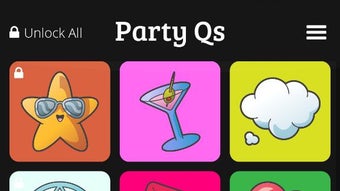
The user interface of Party Qs is designed for simplicity and immediate usability. The layout is clean, with clearly labeled categories and a straightforward question display. Navigation is intuitive, allowing users to browse through categories or search for specific topics with minimal effort. The workflow centers around selecting answers via tapping, checkbox selection, or the "Other" option, all of which are responsive and visually clear.
Performance observations are based on general software behavior patterns. The app operates smoothly within the Android ecosystem, with no reported issues related to lag or crashes. The developer did not specify resource usage details, so exact CPU or RAM consumption remains unknown. However, the 28.8 MB installation size suggests a lightweight footprint, which typically correlates with efficient performance on most modern Android devices. Stability appears consistent, with no indication of frequent crashes or data loss. The app runs entirely offline once installed, ensuring reliable use in settings without internet access.
Compatibility & System Requirements
Party Qs is compatible with Android devices, as specified in the product details. The app is available in version 1.0 and has a file size of 28.8 MB, which is relatively compact for a mobile application with extensive content. The developer did not provide additional system requirements, so information on minimum Android versions, processor speed, or memory specifications is limited. Compatibility information was partially provided, leaving users to rely on standard Android compatibility standards.
Given the app’s size and purpose, it is likely optimized for devices running Android 6.0 (Marshmallow) or later, though this is not confirmed. Users should ensure their device meets basic Android system standards for app installation. No external dependencies or additional software are required for operation.
Pros and Cons
Pros
- Free to download and use with no hidden costs
- Large library of over 1,600 original questions across diverse categories
- Flexible answer selection methods for improved accessibility
- Supports user-generated content for personalization
- Lightweight design with minimal storage footprint
Cons
- No information provided about minimum system requirements
- App is limited to Android platform, with no availability on iOS or desktop
- Limited feedback on performance under high usage or long sessions
- Game mechanics may feel repetitive for some users over time
- Offline functionality is assumed but not explicitly confirmed
FAQ Section
Is Party Qs available for iOS devices?
Currently, the app is only available for Android. There is no information about future iOS support.
Can I use Party Qs without an internet connection?
Yes, the app functions offline after installation, allowing users to engage in conversations without requiring an internet connection.
Is Party Qs safe to download and use?
As a free app from Party Qs Inc., it is distributed through official Android channels. No security risks were reported in the provided information.
How often are updates released?
The app is currently at version 1.0. The release date was May 20, 2024, but no details about update frequency are available.
Can I add my own questions to the app?
Yes, users can contribute their own questions, allowing for customization and long-term use tailored to personal or group preferences.
Final Thoughts + CTA
Party Qs delivers a unique and engaging approach to social interaction, combining the fun of a game with the practicality of a conversation starter. Its extensive library of original questions, flexible interface, and support for user-generated content make it a standout tool for anyone looking to enhance their social experiences. While platform limitations and lack of detailed system requirements are notable drawbacks, the app’s lightweight design and free access make it highly accessible.
It is especially beneficial for individuals involved in dating, event planning, team building, or casual socializing. The game-like feedback system adds a layer of engagement that keeps users invested in the conversation flow. For those seeking a simple yet effective way to spark meaningful connections, Party Qs offers a compelling solution.
Download Party Qs now to bring more fun and connection to your next gathering.
Guides & Tutorials for Party Qs
How to install Party Qs
- Click the Preview / Download button above.
- Once redirected, accept the terms and click Install.
- Wait for the Party Qs download to finish on your device.
How to use Party Qs
This software is primarily used for its core features described above. Open the app after installation to explore its capabilities.
User Reviews for Party Qs 0
No reviews found





